GitHub Copilot Free for Students in 2026: How to Get It (Step by Step)
ScoviAI TeamUpdated 5 min read
The short answer
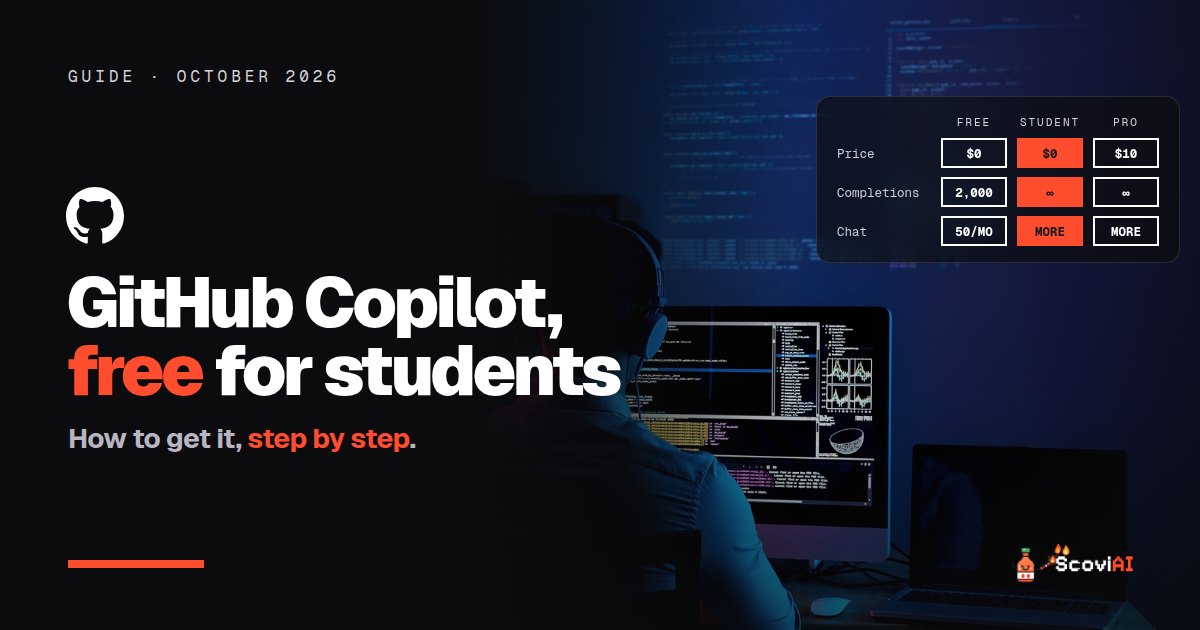
Verified students get the GitHub Copilot Student plan free through the GitHub Student Developer Pack, with unlimited code completions. Teachers and popular open-source maintainers get Copilot Pro free, and anyone can use Copilot Free with 2,000 completions and 50 chats a month.Yes, you can get GitHub Copilot free for students. Verified students get the Copilot Student plan at no cost through the GitHub Student Developer Pack, while everyone else pays $10 a month for Copilot Pro. Verified teachers and maintainers of popular open-source projects get Copilot Pro free as well. And if you can't verify, the Copilot Free plan gives anyone 2,000 code completions and 50 chat requests a month.
Quick answer: apply for the GitHub Student Developer Pack with your school email or proof of enrollment. Once GitHub Education approves you, Copilot Student is activated on your GitHub account and works in VS Code, JetBrains IDEs, the CLI and GitHub.com.
GitHub Copilot plans compared (October 2026)
| Copilot Free | Copilot Student | Copilot Pro | |
|---|---|---|---|
| Price | $0 | $0 for verified students | $10 a month |
| Code completions | 2,000 a month | Unlimited | Unlimited |
| Chat | 50 requests a month | Limited chat and agent use, plus an allowance of GitHub AI Credits | Higher limits |
| Who can get it | Everyone | Verified students | Everyone (free for verified teachers and popular OSS maintainers) |
As of October 2026, from GitHub's Copilot plans and the Student Developer Pack.
What is GitHub Copilot?
GitHub Copilot is GitHub's AI coding assistant. It suggests code as you type, answers questions in a chat panel, and includes an agent that can make changes across your project or work on an issue on GitHub. It runs inside the editors students already use, especially VS Code and JetBrains IDEs, so there's nothing new to learn.
ADVERTISEMENT
What do students get for free?
The Copilot Student plan includes:
- Unlimited code completions in your editor.
- An allowance of GitHub AI Credits, plus limited chat and agent usage.
- Models chosen through auto model selection, so GitHub picks a suitable model for each request.
GitHub also notes that short-term rate limits can apply even when you still have allowance left, so very heavy sessions may slow down for a while. For coursework and personal projects, the free plan is generous.
How to get GitHub Copilot free as a student, step by step
- Create a GitHub account if you don't have one. Using your personal email is fine; you'll add your school email next.
- Add and verify your school email in your GitHub email settings, if your school gives you one.
- Apply for the Student Developer Pack at education.github.com/pack. You'll be asked for proof of enrollment, such as your school email or a photo of a student ID.
- Wait for approval. GitHub Education reviews applications; approval can be quick or take a few days.
- Turn on Copilot. Once you're approved, Copilot Student becomes available in your GitHub account settings. Install the GitHub Copilot extension in your editor and sign in.
You can follow the same steps from our GitHub Copilot free for students deal, where members vote on the offer.
Is GitHub Copilot free for teachers?
Yes. Copilot Pro is free for teachers verified through GitHub Education, and for maintainers of popular open-source projects. GitHub rechecks maintainer eligibility every month. Details are on our Copilot Pro for teachers and maintainers deal.
What if I'm not a student? Copilot Free
GitHub Copilot has a free plan for everyone, no student status needed. Each month you get 2,000 code completions and 50 chat requests, with access in editors, the CLI, GitHub.com and agent mode. It isn't available if you already have a Copilot Business or Enterprise seat. When you need more, Copilot Pro costs $10 a month.
What else is in the Student Developer Pack?
The Copilot plan is the headline, but the GitHub Student Developer Pack bundles free offers from many other developer tools, such as the Deepnote Team plan. It's worth browsing the full list after you're approved, because some offers (like domain names or cloud credits) are easy to forget and expire if you don't claim them.
GitHub Copilot vs Cursor for students
Students often ask whether to use Copilot or Cursor. You don't have to choose:
- Copilot works inside the editor you already use, and it's free for as long as you're a verified student.
- Cursor is a full AI code editor with a stronger built-in agent, and verified university students get Cursor Pro free for a year.
A common setup is Copilot in VS Code or JetBrains for class, and Cursor for bigger personal projects. Our AI coding assistant pricing guide compares the paid plans in detail.
Copilot Free or Copilot Student: is verifying worth the effort?
If Copilot Free already costs nothing, why bother with verification? Because the limits feel very different once you code every day:
- 2,000 completions a month on Copilot Free sounds like a lot, but suggestions appear constantly while you type. A few busy evenings of coursework can use up a big share of them. The Student plan has unlimited completions, so you never have to ration them before an exam or a deadline.
- 50 chat requests a month is roughly two questions a day. Students tend to ask far more than that when they're learning, debugging or reading unfamiliar code.
- The Student plan lasts as long as you're verified, not just for a trial period.
Verification takes a few minutes and is free, so if you're eligible, it's the better option. Copilot Free is a good fallback if your application is still being reviewed, or once you graduate and want to keep using Copilot without paying.
How to use Copilot well as a student
- Write a clear comment first. Copilot's suggestions get much better when you describe what the function should do.
- Use chat to understand, not just to copy. Ask it to explain an error or a piece of code, then fix it yourself.
- Let the agent handle setup. Project scaffolding, configuration and test boilerplate are great tasks to hand off.
- Check your course's AI policy. Some classes allow AI help, others don't. Ask before you submit AI-assisted code.
Common problems and fixes
- "My application was rejected." Use your school email and upload clear proof of enrollment that shows a current date. You can reapply.
- "Copilot isn't showing up." Sign out and back in to the Copilot extension in your editor after approval.
- "I hit a rate limit." Short-term limits reset quickly; wait a bit, or switch to lighter tasks.
- "My student status ended." When you graduate, the student plan ends. You can move to Copilot Free or pay for Copilot Pro.
Is GitHub Copilot free for students worth claiming?
Absolutely. It's free, it works in the tools you already use, and it lasts for as long as you're a verified student. Claim it alongside the other free offers in our AI student discounts guide, and browse more developer deals in our coding category.
Sources: GitHub Student Developer Pack; Plans for GitHub Copilot; Copilot for teachers and open-source maintainers; Copilot plans; checked in October 2026.
ADVERTISEMENT
Frequently asked questions
›Is GitHub Copilot free for students?
Yes. Verified students get the Copilot Student plan at no cost through the GitHub Student Developer Pack. Copilot Pro normally costs $10 a month.
›How do I get GitHub Copilot for free as a student?
Apply for the GitHub Student Developer Pack at education.github.com/pack with proof of enrollment, such as your school email or student ID. After approval, Copilot Student becomes available in your GitHub account.
›What's included in Copilot Student?
Unlimited code completions, an allowance of GitHub AI Credits, and limited chat and agent usage with models chosen by auto model selection.
›Is GitHub Copilot free for teachers?
Yes. Copilot Pro is free for teachers verified through GitHub Education and for maintainers of popular open-source projects.
›Can I use Copilot for free without being a student?
Yes. Copilot Free gives anyone 2,000 code completions and 50 chat requests a month.
Written by the ScoviAI team. We check prices on each seller's own pricing page and update our guides when plans change. Some links may be affiliate links; they never change our verdicts. How we work
Live deals for the tools in this guide
GitHub Copilot Pro is free for verified teachers and OSS maintainers
GitHub Copilot · Coding ·
GitHub Copilot free for verified students (Student Developer Pack)
GitHub Copilot · Coding ·
GitHub Copilot Free: 2,000 completions + 50 chat requests every month
GitHub Copilot · Coding ·