AI Coding Assistant Pricing in 2026: Cursor vs GitHub Copilot vs Kiro vs Windsurf
ScoviAI Team5 min read
The short answer
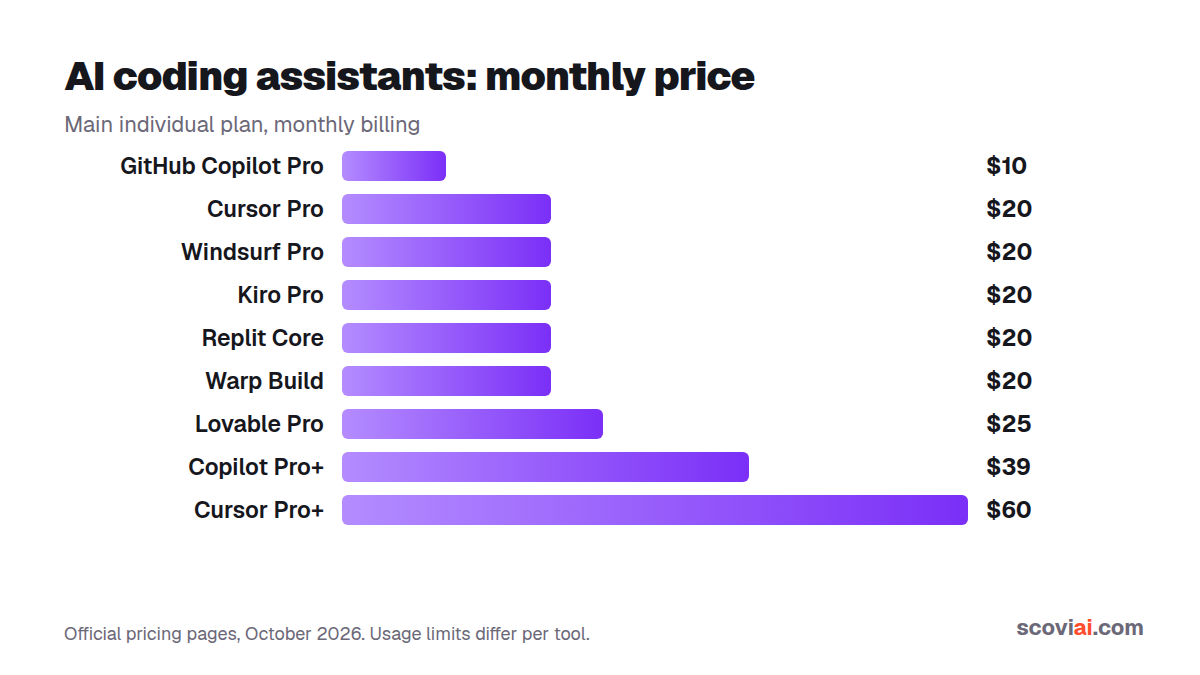
GitHub Copilot Pro is the cheapest paid AI coding assistant at $10 a month. Cursor Pro, Windsurf Pro and Kiro Pro cost $20 a month for a full AI editor with agents. Students can get Copilot, Cursor and Kiro free.AI coding assistant pricing looks simple at first: almost everything costs $10 or $20 a month. The differences hide in what that money buys: how many agent requests, which models, and what happens when you run out. We compared the plans of the most popular AI coding tools on their official pricing pages, so you can pick the right one and avoid paying twice.
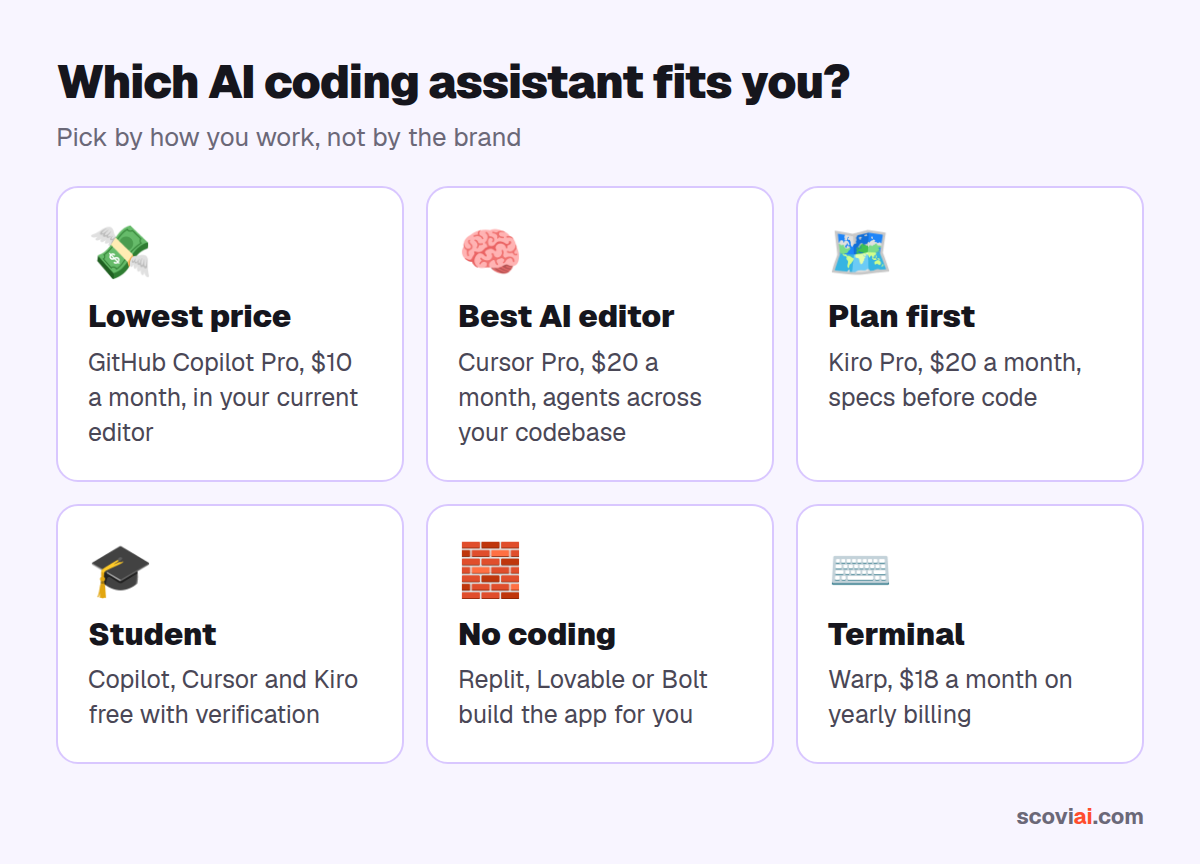
Quick verdict: the cheapest paid option is GitHub Copilot Pro at $10 a month. Cursor Pro, Windsurf Pro and Kiro Pro all cost $20 a month and give you a full AI-first editor with agents. If you're a student, you can get Copilot, Cursor and Kiro for free. And if you'd rather describe an app than write code, look at Replit, Lovable or Bolt.
AI coding assistant pricing at a glance
| Tool | Free plan | Main paid plan | Higher plans | Free for students? |
|---|---|---|---|---|
| GitHub Copilot | 2,000 completions + 50 chats a month | Pro: $10/mo | Pro+: $39/mo | Yes |
| Cursor | Hobby: limited agent requests | Pro: $20/mo | Pro+: $60/mo, Ultra: $200/mo | Free year |
| Windsurf | Light agent quota, unlimited Tab | Pro: $20/mo | Teams plans | Student discount |
| Kiro | 50 credits a month | Pro: $20/mo (1,000 credits) | Pro+: $40, Pro Max: $100 | Free year |
| Replit | Starter (free) | Core: $20/mo ($18 yearly) | Teams | — |
| Warp | Free plan | Build: $20/mo ($18 yearly) | — | — |
| JetBrains AI | Included quota in IDEs | Paid AI tiers | — | Free with Student Pack |
All prices are in US dollars per user per month.
Why $20 doesn't buy the same thing everywhere
AI coding tools charge for two very different things:
- Completions: the gray suggestions that appear as you type. They're cheap to run, so most paid plans make them unlimited.
- Agent work: asking the AI to change several files, run commands and fix errors on its own. This uses the most expensive models, so every tool meters it with requests, credits or included API usage.
Cursor Pro, for example, includes $20 of model usage a month; Kiro Pro includes 1,000 credits; Copilot Pro includes a monthly allowance of premium requests. When you run out, you either wait for the next month or pay for more. If you mostly use autocomplete, the cheapest plan is plenty. If you hand big tasks to agents every day, look at the higher tiers.
What "unlimited" really means
Several plans promise "unlimited" completions or Tab suggestions, and that part is true: autocomplete rarely runs out. But agent features, premium models and long chats are always limited, even on the $20 plans. Before you upgrade, check which part of the tool you actually use. If you mostly accept inline suggestions and ask the occasional question, the free tier or Copilot Pro at $10 is usually enough. If you regularly ask the AI to "build this feature" across ten files, you'll feel the limits of every $20 plan, and that is when Pro+ or pay-as-you-go usage starts to make sense.
GitHub Copilot: the cheapest paid plan
GitHub Copilot works inside the editors you already use: VS Code, Visual Studio, JetBrains IDEs, Xcode and more. The free plan gives 2,000 code completions and 50 chat requests a month, enough to try it properly. Copilot Pro costs $10 a month, half the price of the AI-first editors, and Pro+ at $39 a month is for heavy agent users.
Best for: developers who want to keep their current editor and spend as little as possible.
Cursor: the most popular AI-first editor
Cursor is a fork of VS Code built around AI: next-edit predictions, chat that understands your whole codebase and an agent that can work across many files. The free Hobby plan has limited agent requests. Pro is $20 a month with unlimited Tab completions and $20 of included model usage; Pro+ ($60) and Ultra ($200) are for people who run agents all day. Verified university students get a free year of Pro.
Best for: professional developers who want the strongest AI editing experience.
Windsurf and Kiro: the alternatives worth testing
Windsurf offers a free plan with a light agent quota and unlimited Tab completions, and Windsurf Pro costs $20 a month. Usage on paid plans refreshes daily and weekly.
Kiro, from AWS, takes a different approach: it turns your request into a written spec (requirements, design, tasks) before agents write code. The free tier has 50 credits a month; Pro is $20 a month with 1,000 credits, and bigger tiers go up to $200. Students can get Pro-level credits free for a year.
Best for: Windsurf if you like Cursor's style but want a second opinion; Kiro if you work on larger features that benefit from planning.
Don't want to write code? App builders compared
If you want a working app rather than help writing code, these tools build the whole thing from a description:
- Replit: Agent builds, runs and hosts your app in the browser. Core is $20 a month or $18 on yearly billing.
- Lovable: chat-built web apps with database and login; Pro is $25 a month, and students get 50% off.
- Bolt.new: the free plan gives 1M tokens a month; Pro is $25 a month.
- v0 by Vercel: $5 of free credits every month for React and Next.js apps.
AI in the terminal
Warp is a modern terminal with built-in agents that write and run commands and fix errors. Its Build plan is $20 a month or $18 on yearly billing, and you can bring your own API keys.
How to pay less for AI coding tools
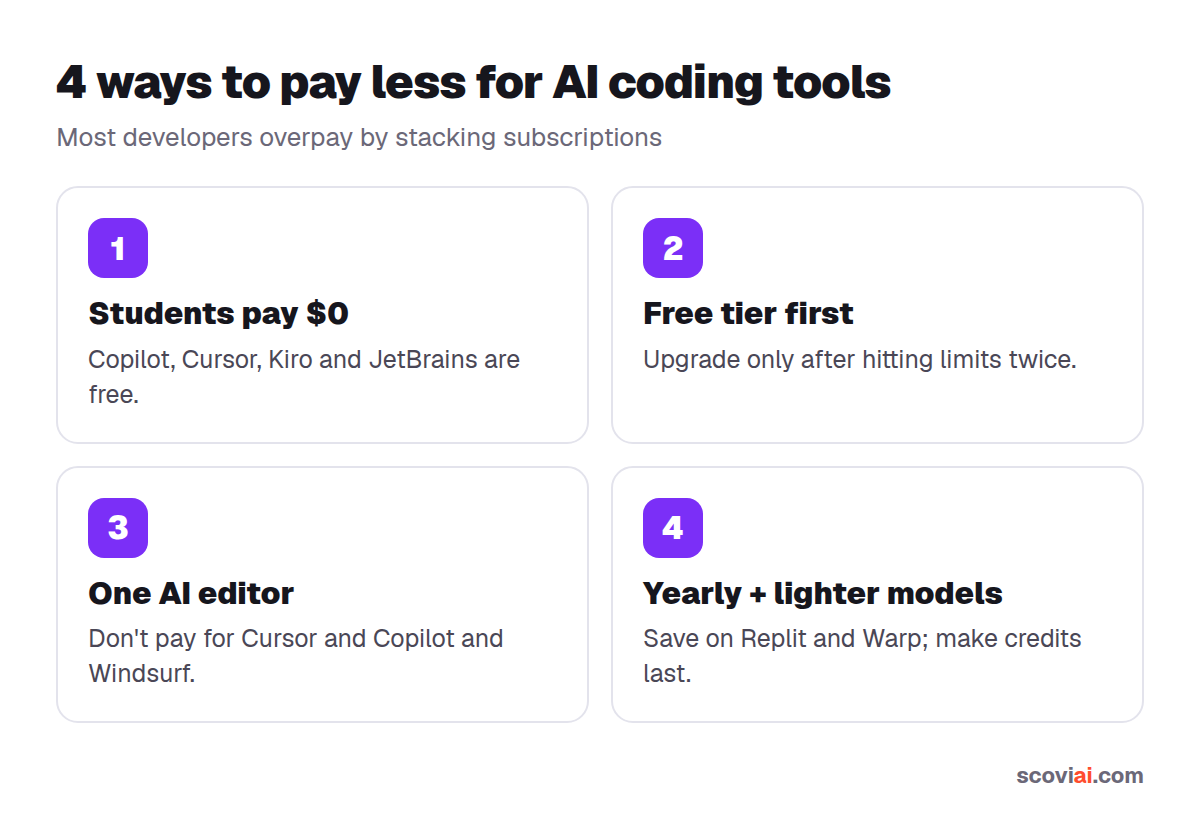
- Students: don't pay at all. Copilot, Cursor, Kiro and JetBrains all have free student offers. See our AI student discounts guide.
- Start on the free tier and upgrade only when you hit the limit two months in a row.
- Pick one AI editor. Paying for Cursor and Copilot and Windsurf is the most common way developers waste money.
- Use yearly billing where it exists (Replit, Warp) once you're sure, and switch models to lighter ones for routine tasks so your credits last longer.
Our pick
| If you… | Choose |
|---|---|
| Want the lowest price | GitHub Copilot Pro ($10/mo) |
| Want the best AI-first editor | Cursor Pro ($20/mo) |
| Like planning before coding | Kiro Pro ($20/mo) |
| Are a student | Cursor + Copilot + Kiro, all free |
| Don't code | Replit, Lovable or Bolt |
Sources: official pricing pages of Cursor, GitHub Copilot, Windsurf, Kiro, Replit and Warp, checked in October 2026.
Frequently asked questions
›What is the cheapest AI coding assistant?
GitHub Copilot Pro at $10 a month is the cheapest paid plan among the popular AI coding assistants. Copilot also has a free plan with 2,000 code completions and 50 chat requests a month.
›How much does Cursor cost?
Cursor has a free Hobby plan. Pro costs $20 a month and includes $20 of model usage, Pro+ is $60 a month and Ultra is $200 a month. Verified university students can get Pro free for a year.
›Is GitHub Copilot free?
Yes, there is a free plan with monthly limits, and verified students get Copilot free through the GitHub Student Developer Pack. Copilot Pro is $10 a month and Pro+ is $39 a month.
›Is Cursor better than GitHub Copilot?
Cursor is a full AI-first editor with stronger multi-file agent features; Copilot is cheaper and works inside the editor you already use. Many developers try both free tiers before choosing.
›Which AI coding tools are free for students?
GitHub Copilot, Cursor Pro (one year), Kiro (one year of 1,000 credits a month) and JetBrains IDEs with AI are free for verified students.
Written by the ScoviAI team. We check prices on each seller's own pricing page and update our guides when plans change. Some links may be affiliate links; they never change our verdicts. How we work