Grammarly vs QuillBot in 2026: Price, Free Plans and Which to Choose
ScoviAI Team5 min read
The short answer
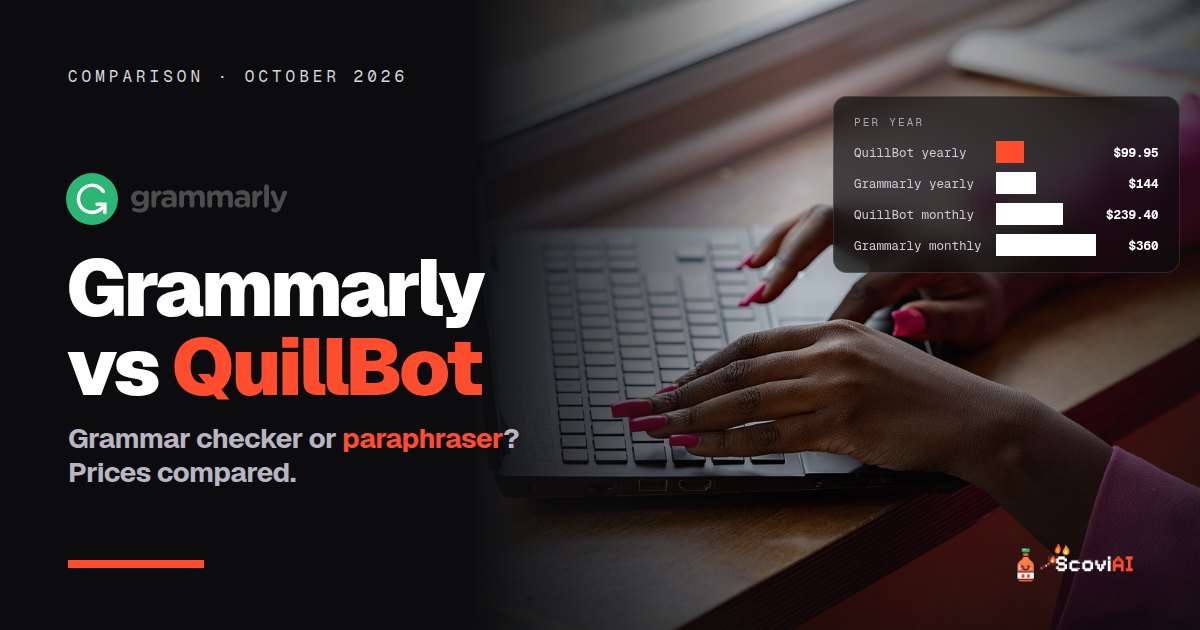
QuillBot Premium costs $99.95 a year and is best for paraphrasing, summarizing and citations. Grammarly Pro costs $144 a year and is best for checking emails and documents as you type.Grammarly vs QuillBot: Grammarly is the better grammar and tone checker for everyday and work writing, while QuillBot is the better paraphraser and study tool, and it's cheaper. On yearly billing, Grammarly Pro costs $144 a year ($12 a month) and QuillBot Premium costs $99.95 a year (about $8.33 a month). On monthly billing the gap is bigger: $30 vs $19.95 a month. Both have useful free versions.
Quick answer: students and anyone who rewrites, summarizes or cites sources should pick QuillBot Premium (yearly). Professionals who write emails and documents all day, especially non-native English speakers, should pick Grammarly Pro (yearly). If you only need spell-check, stay on Grammarly's free plan.
Grammarly vs QuillBot: prices
| Grammarly Pro | QuillBot Premium | |
|---|---|---|
| Monthly | $30 | $19.95 |
| Quarterly | $60 every 3 months ($20 a month) | $39.95 every 3 months |
| Yearly | $144 ($12 a month) | $99.95 (about $8.33 a month) |
| Free version | Yes, with 100 AI prompts a month | Yes, paraphrasing up to 125 words at a time |
As of October 2026, from Grammarly's plans page and QuillBot Premium. Our deal pages: Grammarly Pro yearly and QuillBot Premium yearly.
Over a year, QuillBot Premium is $44.05 cheaper than Grammarly Pro on yearly billing, and $120.60 cheaper if you'd pay both monthly ($239.40 vs $360).
What each tool is built for
Grammarly checks your writing as you type, everywhere: email, documents, browser and apps. It catches spelling, grammar and punctuation mistakes, shows your tone and, on Pro, rewrites full sentences, adjusts tone and supports style guides and brand tones for teams.
QuillBot is a toolbox for working with text: a paraphraser (its best-known tool), grammar checker, summarizer and citation generator. Premium adds unlimited paraphrasing, more paraphrasing modes, a plagiarism checker and longer summaries.
So they overlap on grammar, but the main jobs are different: Grammarly polishes what you write; QuillBot helps you rework, shorten and cite text.
ADVERTISEMENT
Free versions compared
- Grammarly Free: spelling, grammar and punctuation checks, tone detection and 100 generative AI prompts a month. Enough for most everyday emails and messages.
- QuillBot Free: paraphrases up to 125 words at a time and summarizes up to 1,200 words, plus the free grammar checker.
Many people never need to pay for either. Try both free versions for two weeks before you buy.
What you get when you pay
Grammarly Pro adds full-sentence rewrites, tone adjustments, style guides and brand tones for teams, and 2,000 AI prompts a month. It replaced the old Grammarly Premium plan.
QuillBot Premium adds unlimited paraphrasing, more modes, the plagiarism checker and longer summaries.
Which is better for students?
QuillBot, for most students. Paraphrasing, summarizing and citations are exactly what essays and research papers need, and Premium is the cheapest full-featured writing tool at $99.95 a year. Use it responsibly: paraphrasing tools help you understand and restate sources, but your school's rules on AI and plagiarism still apply.
Before you pay for anything, ask your library: some universities give students Grammarly through a school license. More student offers are in our AI student discounts guide.
Which is better for work?
Grammarly, for most professionals. It sits in every app you type in, catches mistakes before you hit send and helps with tone, which matters in emails to clients and managers. For teams, Pro is priced per member and adds shared style guides, brand tones and snippets.
Which is better for non-native English speakers?
Grammarly is the stronger everyday helper, because it checks and corrects your writing in real time wherever you type. QuillBot is useful too, especially for rephrasing a sentence that doesn't sound natural. Many non-native speakers use Grammarly for everything they write and QuillBot's free paraphraser when they get stuck on a sentence.
Other options worth comparing
- ProWritingAid: deeper style reports for long documents and fiction; Premium is $120 a year or $30 a month.
- Sudowrite: an AI writing partner for fiction; Hobby & Student is $10 a month on yearly billing.
- DeepL Write and translation: DeepL Pro Individual is $8.74 a month billed yearly if you also translate.
Our Grammarly Pro price guide compares all of them in one table.
Grammarly vs QuillBot: which should you choose?
- Student writing essays and research papers: QuillBot Premium, yearly ($99.95).
- Professional writing emails and documents all day: Grammarly Pro, yearly ($144).
- Non-native English speaker at work: Grammarly Pro, plus QuillBot's free paraphraser.
- Novelist or long-form writer: look at ProWritingAid instead.
- Occasional emails: Grammarly Free.
Common mistakes
- Paying monthly "just to try it". Three months of Grammarly Pro on monthly billing is $90, most of the way to a full year at $144.
- Buying both. If you need both jobs, pay for the one you use most and keep the other's free version.
- Ignoring the free plans. Grammarly Free still catches spelling, grammar and punctuation everywhere you type.
- Forgetting the renewal date. Yearly plans renew automatically at the full yearly price.
Real-world examples: Grammarly or QuillBot?
- A college student writing three essays a month: QuillBot Premium on yearly billing. Paraphrasing, summaries and citations save the most time, and it's the cheaper plan.
- A marketing manager writing emails and reports all day: Grammarly Pro on yearly billing, so every email and document is checked as you type.
- A non-native English speaker in a client-facing job: Grammarly Pro for real-time corrections and tone, plus QuillBot's free paraphraser for sentences that don't sound natural.
- A blogger who rewrites old posts: QuillBot for rewording and summarizing, and Grammarly Free for a final check.
- A novelist: neither is ideal on its own; ProWritingAid's style reports or Sudowrite fit long-form fiction better.
- Someone who writes a few emails a week: Grammarly Free. Don't pay.
How we compared Grammarly and QuillBot
We used only prices published on Grammarly's and QuillBot's own plans pages, in US dollars, for one person, as of October 2026. "Per month" for yearly plans means the yearly price divided by 12. We compared what each free version really allows, because for many people the right answer is not to pay at all, and we left out unofficial coupon codes. Schools sometimes give students Grammarly through a license, so the cheapest option for you may be free.
Tips before you buy either
- Test both free versions on your real work for a week: one essay or one week of emails tells you more than any comparison.
- Check your school or employer first. Some universities and companies already provide Grammarly.
- Pay yearly only after a month. The yearly plans save the most, but only if you keep using the tool.
- Set a reminder before renewal, since both yearly plans renew automatically.
Bottom line
QuillBot Premium is the cheaper choice and the better one for students and anyone who rewrites or summarizes text. Grammarly Pro is the better choice for professionals who want every email and document checked as they type. Whichever you pick, pay yearly. Every current offer is on our writing deals page.
Sources: Grammarly plans; QuillBot Premium; ProWritingAid pricing; checked in October 2026.
ADVERTISEMENT
Frequently asked questions
›Is QuillBot cheaper than Grammarly?
Yes. QuillBot Premium costs $99.95 a year or $19.95 a month; Grammarly Pro costs $144 a year or $30 a month.
›Which is better for students, Grammarly or QuillBot?
QuillBot, for most students: its paraphraser, summarizer and citation generator suit essays and research papers, and Premium is cheaper. Check whether your school already provides Grammarly.
›Is Grammarly or QuillBot free?
Both have free versions. Grammarly Free checks spelling, grammar and punctuation with 100 AI prompts a month; QuillBot Free paraphrases up to 125 words at a time and summarizes up to 1,200 words.
›Which is better for work emails?
Grammarly, because it checks your writing in every app as you type and helps with tone.
›Should I buy both Grammarly and QuillBot?
Usually not. Pay for the one you use most and keep the other's free version.
Written by the ScoviAI team. We check prices on each seller's own pricing page and update our guides when plans change. Some links may be affiliate links; they never change our verdicts. How we work